
Google Play Store PC
Google Play is Google's digital distribution platform. On Windows, Google offers Play content through the browser and Google Play Games on PC.
52.9 MB
Auto Key Presser is a small free Windows tool by Arifur Rahman that presses a chosen key automatically at a set interval.
Average 0.0 · ratings: 0
Thank you! Your rating is saved; you can change it. Could not save the rating. Please try again later. Too many ratings from your network today. Please try again tomorrow. The average appears after 5 ratings.
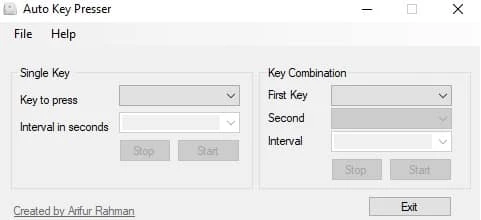
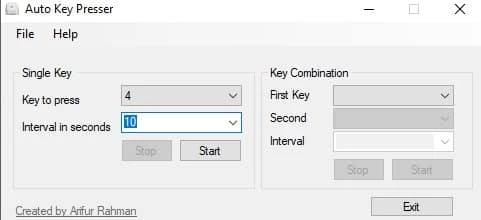
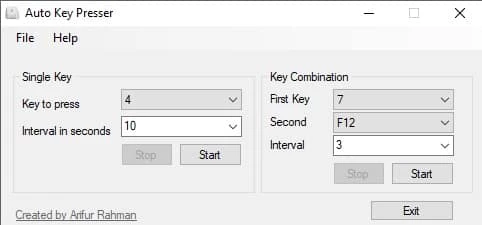
Auto Key Presser 0.0.7 is a small free Windows tool by Arifur Rahman that presses a key for you, repeatedly and at an interval you choose. It saves your fingers from monotonous work such as holding or tapping the same key for minutes at a time. You can download Auto Key Presser for Windows from the author's website, arifur.net.
Plenty of computer tasks involve pressing the same key again and again: scrolling through a long document page by page, advancing slides at a steady pace during a rehearsal, keeping an application from going idle while a long process runs, testing how a program reacts to repeated input, or accessibility needs for people who find repeated key presses physically tiring. An auto key presser takes over that repetition. You choose the key, set how often it should be pressed and start it with a hotkey; press the hotkey again to stop. It is a simple, single-purpose tool rather than a macro recorder, which makes it quick to set up and easy to understand. For sequences of different keys and mouse actions, a macro or automation tool is the better fit.
The author described an earlier release in a blog post about version 0.0.5.
Very short intervals can flood a program with input faster than it can react, which leads to missed presses or a frozen window. Start with a press every second or two and shorten it only if the task really needs it. For scrolling or slide advancing, a slower rhythm is usually easier to follow and to stop in time.
For mouse clicks, our listings include OP Auto Clicker. TinyTask records and replays sequences of mouse and keyboard actions.
Google Play is Google's digital distribution platform. On Windows, Google offers Play content through the browser and Google Play Games on PC.
Media Creation Tool is a free Microsoft utility that downloads Windows and turns it into a bootable USB flash drive or an ISO file.

LDPlayer is an Android emulator for Windows that runs mobile apps and games on a computer.

BlueStacks is an Android emulator for Windows that lets you run Android apps and games on your PC.
Rufus is a free Windows utility that turns a USB stick into a bootable installer. The current version is 4.15.

PC App Store is a free software store for Windows from Baidu for finding, installing and updating PC programs. This page covers version 5.0.1.8682.

Uptodown App Store for Windows is the desktop client of Uptodown, a marketplace for desktop software and mobile apps. This page covers version 1.0.3.

NoxPlayer is a free Android emulator from Bignox for Windows and macOS that runs mobile games and apps on a computer with keyboard and mouse control.